I ported GNOME Files to MacOS
Hi there.
I ported GNOME Files (you may know it as Nautilus) to MacOS. It's called Miles, it's free and open source, and you can install it today.
This is a short announcement, for anyone looking for a free and open source alternative to the Finder app that comes with a Mac.
Motivation
I switched from Linux, with the GNOME desktop and its apps, to a Mac because work required it.
I loved GNOME's interface: its consistency, its speed, and how easy it is to use. So I was pretty disappointed when I switched over. Managing windows and folders on the Mac never felt right to me.
What did I miss from Files? Everything, honestly. The consistency, the way things are organized, and how it looks.
After two years, I decided it was time to port Files (again).
Were there other options?
I tried other file managers, but most of them are paid and I couldn't afford to pay. The ones I tried also didn't look as good to me as Files does.
Homebrew didn't have a build of Nautilus either. I tried building it myself back then, but libraries that only exist on Linux were the blocker. That's the "again" from earlier :)
What is Miles?
Mac + Files. MacFiles. So, Miles.
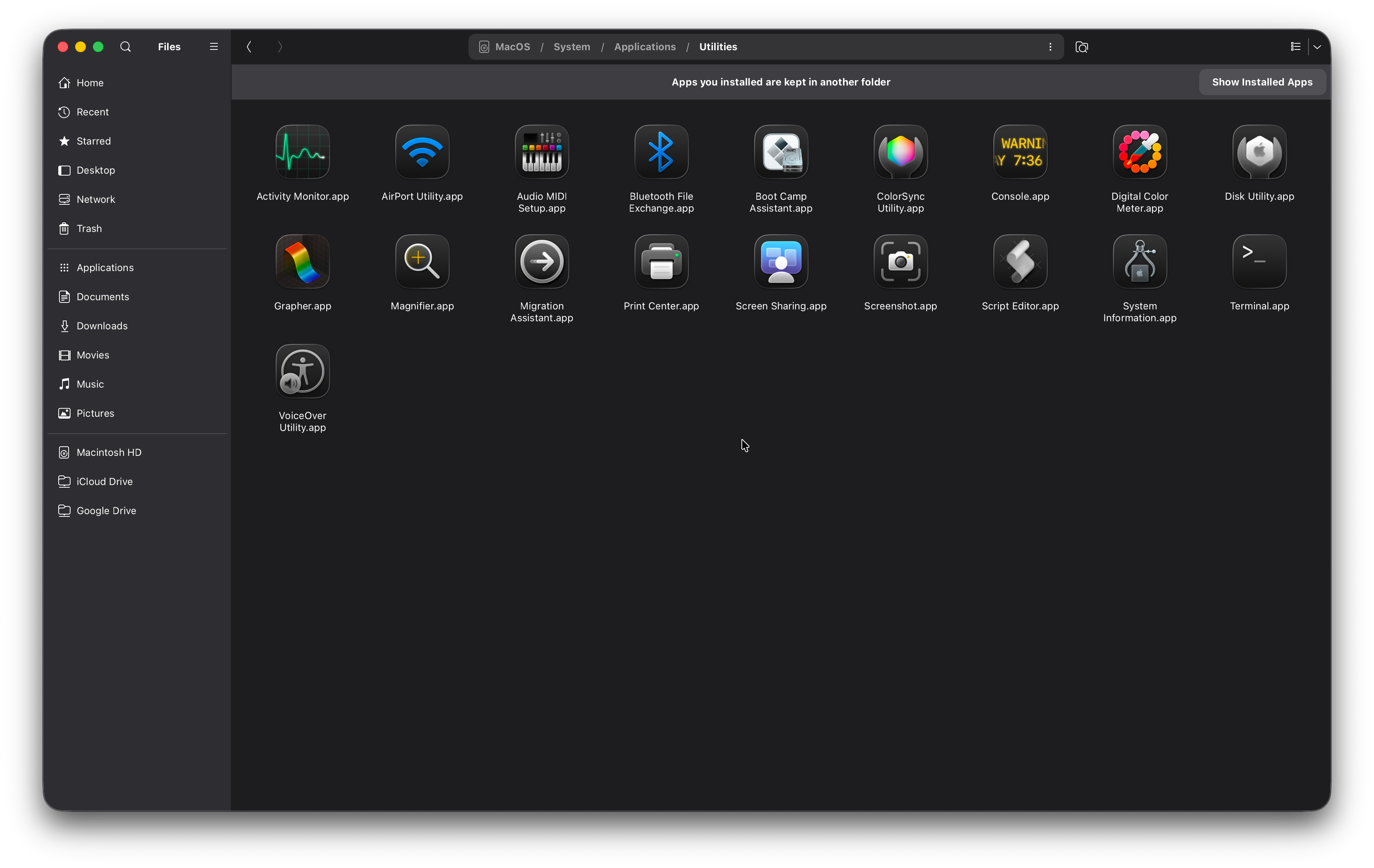
It looks and works the way Files does on GNOME, and follows MacOS wherever the Mac has its own way of doing things. It's based on Files 51.0.1.
What am I happy about?
Search, first. It had always been broken for me on the Mac. Simple queries didn't work for me in Finder, only in Spotlight, and that wasn't very reliable either. In Miles, search finds files by name, with no index to wait for.
Then uninstall. Dragging an app to the Trash, away from the folder it's already in, is bad UX to me. In Miles, you right-click an app and pick Uninstall. It moves the app to the Trash, and it can take the settings and data the app left in your Library along with it.
Network folders work too. Servers on your local network show up by themselves, and you can connect to SFTP, WebDAV, FTP, and AFP servers by address.
And theming. I've used Yaru before and I loved it (nostalgia), so Miles uses the Yaru icon theme. Folders take the accent colour you picked in System Settings, and they change with the light and dark appearance.
Why not Spotlight?
Files on GNOME searches with an indexer (a service that keeps a list of your files ready, so searching is quick). That indexer doesn't exist on a Mac, so I had to switch it for something else.
Spotlight is the index MacOS already has, so it was the first thing to reach
for. But it has never just worked for me, from day one. Searching by
extension, like .png or .dmg, was hit and miss. And the port shouldn't be
slow.
So Miles goes through your folders itself. Once that turned out to be the better option, Spotlight wasn't needed anymore. The price is searching inside the contents of files, which only an index gives you.
Why does Miles start its own D-Bus?
Network folders, the Trash, and Recent come from a part of GNOME called gvfs. It talks to Files over D-Bus, which is how apps and services on a Linux desktop send messages to each other.
A Mac doesn't have that the way Linux does, so Miles starts a private one when it opens, and stops it when you quit.
Where does it differ from GNOME Files?
For consistency, things need to work the way the Mac already handles them. So:
- The Trash is the Trash of MacOS. What you delete in Miles is there in Finder too.
- An app shows as a single item with the icon Finder gives it, and a double-click opens it.
- When MacOS hasn't allowed Miles into a folder, it says so and gives you a button to the right page of System Settings.
- iCloud Drive, Google Drive, and OneDrive show up in the sidebar once their apps are set up.
- Preferences opens with Command-comma. Every other shortcut uses Control, as on GNOME.
What is missing?
- Extensions, and with them Open in Terminal. I can't allow them, since someone would install something custom and break their app.
- Saved passwords for servers. That's for the future.
- Opening a folder as administrator. Not an intended use yet.
- Thumbnails. Pictures and documents show the icon of their type for now, sorry :(
- Searching inside the contents of files.
Where did Claude come in?
All the commits were made by Claude. The architecture was already there, designed by the people who build Files at GNOME, so the port only extends it.
I know the Linux community is not very happy about AI being used to write code. In my defense, I don't know C well enough to make changes to such a large codebase, and I don't have the time to. And inconvenience is such a big motivator.
All the decisions were mine: the design, the architecture, the code style, which modules to patch, and the icon. Claude did the code writing.
Do I trust code I didn't type? Not that much, honestly. I know a little C and how to read code, and I read most of it. But install the app at your own risk.
How can you try it?
With Homebrew, on a Mac with Apple silicon:
brew install astraldev/tap/miles
Then open it, and keep it in the Dock to find it again:
open "$(brew --prefix miles)/Miles.app"
There is also a disk image on the releases page. It needs MacOS 15 or newer, and since the app isn't signed, MacOS warns you the first time you open it.
Licensing and credits
Miles is free software under the GNU General Public License, version 3 or later, the same as Files. The source is on GitHub.
It is unofficial. It isn't made, endorsed, or supported by the GNOME Project or by Apple.
The icons are Yaru by the Ubuntu community, bundled with the app under CC BY-SA 4.0.
Future improvements
Thumbnails, since there are none yet.
A signed app, one that opens without the warning, will only be possible with the help of donations, since the app is free.
How can you help? Bug reports. If something breaks for you, open an issue on GitHub.
Miles also has its own page on this site, with more screenshots.
Thank you for taking the time to read! :)